


Survey Merchandiser - Gigs
3.33.81K Reviews
App Specs
- Version
- 5.0.20
- Updated On
- License
- Free
- Downloads
- 500,000+
- Developer
- Survey.com
- Categories
- Business
- Platform
- Android
Screenshots



 Analysis by AppCompare
Retail tasks can sound simple until you factor in travel, waiting around, and the time it takes to submit a careful report. I’d treat Survey Merchandiser - Gigs as a tool for fitting small assignments into a day you already have planned, not as a reason to build your whole day around uncertain work. That distinction matters: a nearby store check may suit a gap between errands, while a special trip for one task can quickly make the effort less appealing.
Plan the day before chasing a task
My first step would be to decide where I’m already going and how much extra time I can spare. Then I’d check whether a relevant task is available around that route. This puts the app in the role of a flexible work organizer, rather than a dependable calendar of shifts: the opportunity needs to fit my plans before I commit to it.
That approach also makes the earnings easier to judge. A task’s displayed payment is only part of the picture; travel, parking, time in the store, and the care needed to complete the instructions all affect its practical value. I’d compare the whole errand with what I would have done anyway, instead of judging a gig by its payout alone.
Capture the details while you are at the store
Retail assignments can involve checking a display, photographing products, or answering questions, so I’d read the instructions before entering the store and keep them in mind as I work. A useful habit is to move through the task in order: identify the right location, confirm what needs checking, take any required photos, and review the answers before submitting. That reduces the chance of having to retrace your steps because one required detail was missed.
Photos deserve particular care. I’d frame the requested product or display clearly, check that the image is usable, and avoid assuming that a quick snap will satisfy every instruction. The goal is not to take more pictures than necessary; it is to provide evidence that answers the task’s specific question. A checklist is most useful when treated as a final quality check, not as a substitute for reading the directions.
For someone fitting a task into a shopping trip, I’d also separate personal shopping from assignment work in my mind. Finish the required observations first, then do the rest of the errand. That simple order can help prevent an ordinary purchase or a distracting queue from making you forget a question or leave before capturing a requested view.
A closer look at the work and the routine
Let’s dive into what makes Survey Merchandiser - Gigs tick. It’s essentially a platform that connects you with various gigs, primarily revolving around retail audits, mystery shopping, and surveys. Think of it as a way to earn a few bucks while doing everyday tasks—sounds like a win-win, right?
Worth Reading Before You Choose

EA SPORTS FC Mobile 26 Is a Bigger Football Game, but It Takes Time

Flipboard Shows What News Apps Must Do Beyond the Feed

Switching to Android Auto Means Rethinking Your Driving Routine

Google Calendar Makes a Crowded Week Easier to Manage

Ludo King Makes the Most of the Minutes Between Plans

Baby Panda World Brings Quick Play to Modern Phones, but Its Game Library Feels Busy
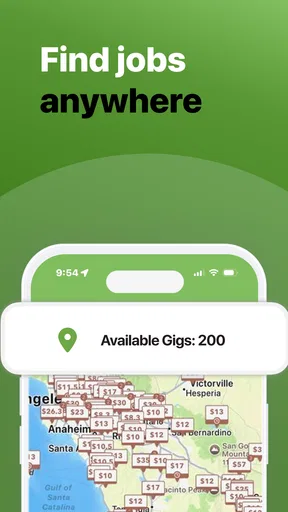
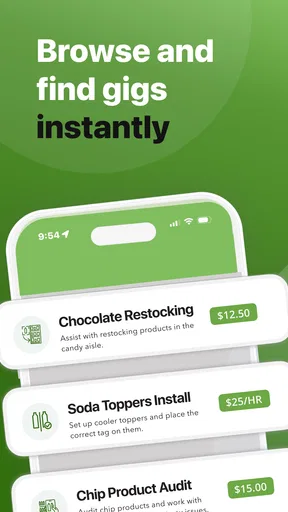
The app’s interface is pretty straightforward, which I appreciate because, let’s be honest, nobody wants to navigate through a complex maze just to earn some pocket change. Once you fire it up, you’re greeted with a map showing available gigs in your vicinity. The gigs range from checking store displays to taking photos of products. It’s varied enough to keep things interesting.
How Does It Work?
Signing up is a breeze. You just need to input some basic info, and you’re good to go. Once you’re in, the app uses your location to show gigs nearby. You can filter these gigs by type or distance, which is handy if you’re looking for something specific.
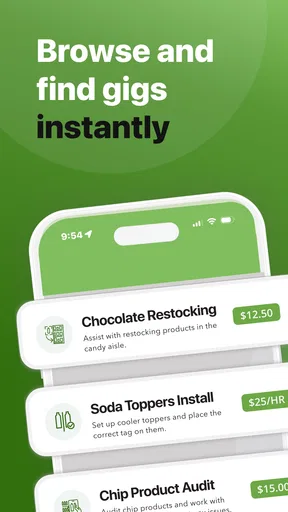
Each gig comes with detailed instructions. You’ll know exactly what’s expected of you, whether it’s snapping a pic of a product or answering a few questions about your shopping experience. The app even has a handy checklist to make sure you don’t miss a thing.
A repeatable routine beats random browsing
Because work is tied to nearby retail opportunities, I wouldn’t open the map every few minutes hoping that a perfect task appears. A better routine is to check it when planning an outing, decide which assignments make sense along the way, and leave enough time to follow the instructions without rushing. If nothing fits, I’d carry on with the day rather than turn browsing into unpaid work.
Before accepting a task, I’d consider three practical questions: Is the location already on my route? Can I give the assignment the attention it needs? Would I still consider the payment worthwhile after accounting for the extra time and travel? These checks are especially helpful when a task looks easy but requires careful photos or a visit at a particular place.
For example, imagine I’m heading to a shopping area to pick up groceries. I could check the map beforehand, choose a nearby display check if one suits my route, and complete it before moving on to my own shopping. I’d read its directions outside the store, take the requested images carefully, then review the checklist before leaving. If the assignment were in another part of town, I’d skip it unless I had another reason to go there.
The Earnings: Is It Worth Your Time?
Now, onto the million-dollar question: can you really make money? The short answer is yes, but it’s more of a side hustle than a full-time gig. Payments for tasks can vary based on complexity and location, but generally, you’re looking at a range from a few bucks to upwards of twenty or thirty for more involved tasks.
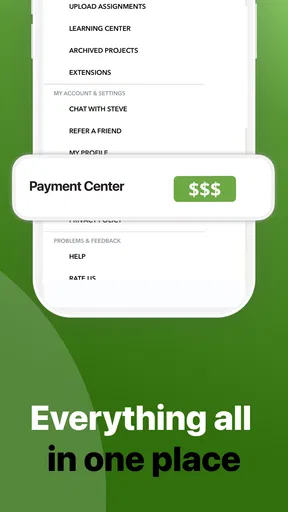
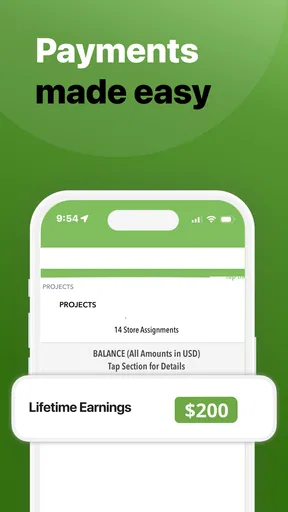
The app pays you via PayPal, which is super convenient. I found the payment process to be pretty smooth, and they do pay promptly once your gig is approved. Just make sure you double-check your submissions before hitting that send button!
How it compares with other ways to earn locally
Compared with survey apps that can be used from a sofa, this work is more rooted in physical places: the useful opportunity is one you can reach and complete in a store. That can make it a better fit for someone already out running errands, but a worse fit for someone who wants all work to happen at home. Online surveys avoid travel, while this app’s retail focus can make the task feel more concrete.
It also differs from regular shift-based work. You can choose tasks rather than commit to a fixed work schedule, which gives you more control over when to participate. The trade-off is that the supply of suitable assignments may not line up with your free time. I’d think of it as opportunistic extra work, not a replacement for a predictable part-time job or a stable income source.
The app is free, and Survey.com is its developer. It sits in the business category, and its audience rating averages 3.3 from around 6,800 ratings, alongside roughly 3,800 written reviews. Those figures suggest a mixed reception rather than a universal favorite, so I’d go in with practical expectations and judge whether nearby tasks suit my own routine.
What I Loved
One of the things that stood out to me was the flexibility. You can pick and choose gigs based on your schedule. Whether you have a free afternoon or just a few minutes between errands, there’s likely a gig that fits your time frame.
Another plus is the community. The app has a built-in feature where users can share tips and advice, which is great if you’re just starting out. There’s a real sense of camaraderie among users, which is always a nice bonus.
Where the routine can break down
Flexibility only helps if the task is actually available when you can do it. Since gigs can be claimed quickly, I wouldn’t plan a day around one appearing or assume that a task will still be there after a long detour. Checking availability before leaving home is more sensible than making a special journey first and hoping the map offers something worthwhile on arrival.
There is also a quality-versus-speed trade-off. Rushing through a store visit can lead to unclear photos or incomplete answers, while taking extra care makes the task longer. I’d allow enough time to inspect the directions and check my submission, particularly when I’m unfamiliar with the location or assignment type. If I have only a few minutes, skipping a task is better than submitting work I haven’t checked.
Approval is another point to keep in mind: payment follows approval, so completing a task does not mean the money is immediate at the moment you leave the store. I’d make the submission as complete as possible and keep expectations realistic. PayPal is the payment route described for the app, which may suit people who already use it, but anyone who relies on a different payment method should consider that before investing time.
Room for Improvement
While I enjoyed the overall experience, there are a couple of areas where the app could improve. Sometimes, gigs can get snatched up pretty quickly, especially in populated areas. It’s a bit of a bummer, but I guess that’s just the nature of the game.
Also, while the app runs smoothly most of the time, I did encounter a glitch or two. Nothing major, but having to restart the app when you’re on a roll can be a tad frustrating.
Who will get the most from it?
I’d recommend it to people who already travel through shops and commercial areas, enjoy short practical assignments, and are comfortable following detailed directions. It can be particularly useful for someone with an irregular schedule who wants to make a little extra from otherwise idle time, provided they treat travel and task completion as real costs.
I’d be more cautious if I needed consistent weekly earnings, dislike taking photos in public places, or cannot easily reach the listed retail locations. It is also not the best match for someone who wants every task to be available on demand. A remote survey service may be more convenient for home-based work, while scheduled employment is the stronger choice when reliable hours matter more than flexibility.
Survey Merchandiser - Gigs has been available since November 13, 2014, and its current version is 5.0.20. It is rated for Everyone and requires Android 8.0 or later. The app has passed 500,000 installs, but reach alone doesn’t tell me whether a task will be worthwhile in my neighborhood; the local mix of assignments and how well they fit my route matter much more.
Overall, Survey Merchandiser - Gigs is a nifty little app for those looking to earn a bit on the side without committing to a rigid schedule. It’s user-friendly, offers a variety of tasks, and pays promptly, which is more than you can say for some apps in the gig economy space. So, if you’re game for some light work during your downtime, give it a whirl and see how it fits into your lifestyle.
Pros
- User-friendly interface for easy navigation.
- Wide variety of gig options available.
- Quick payment process after task completion.
- In-app tools enhance task efficiency.
- Real-time support for user queries.
Cons
- Limited gigs in rural areas.
- Occasional app glitches.
- Requires constant internet connection.
- Battery consumption can be high.
- Some tasks have low pay rates.
FAQs for Survey Merchandiser - Gigs
What is Survey Merchandiser - Gigs and how does it work?
Survey Merchandiser - Gigs is an app that connects users with local gig opportunities in retail environments. Users can complete tasks such as audits, mystery shopping, or shelf stocking for brands and retailers. The app provides detailed instructions for each task, and users can earn money by completing these gigs successfully.
Is Survey Merchandiser - Gigs available on both Android and iOS platforms?
Yes, Survey Merchandiser - Gigs is available for download on both Android and iOS devices. Users can find the app on the Google Play Store for Android devices and the Apple App Store for iOS devices, ensuring accessibility for a wide range of users.
How do users get paid for completing gigs on Survey Merchandiser?
Users get paid for completing gigs via PayPal. Once a task is completed and approved by the app's quality control, the earnings are credited to the user's account. It is essential for users to ensure their PayPal account is linked for a smooth transaction process.
Are there any costs associated with using Survey Merchandiser - Gigs?
Survey Merchandiser - Gigs is free to download and use. There are no hidden costs or subscription fees required to access gig opportunities. Users can start earning money without any initial investment, making it an attractive option for those seeking flexible work.
What types of tasks can I expect to find on Survey Merchandiser - Gigs?
The app offers a variety of tasks including product audits, mystery shopping, shelf stocking, and promotional displays. Tasks vary in complexity, location, and payment, allowing users to choose gigs that match their skills and availability. Each task includes detailed instructions to ensure successful completion.


